
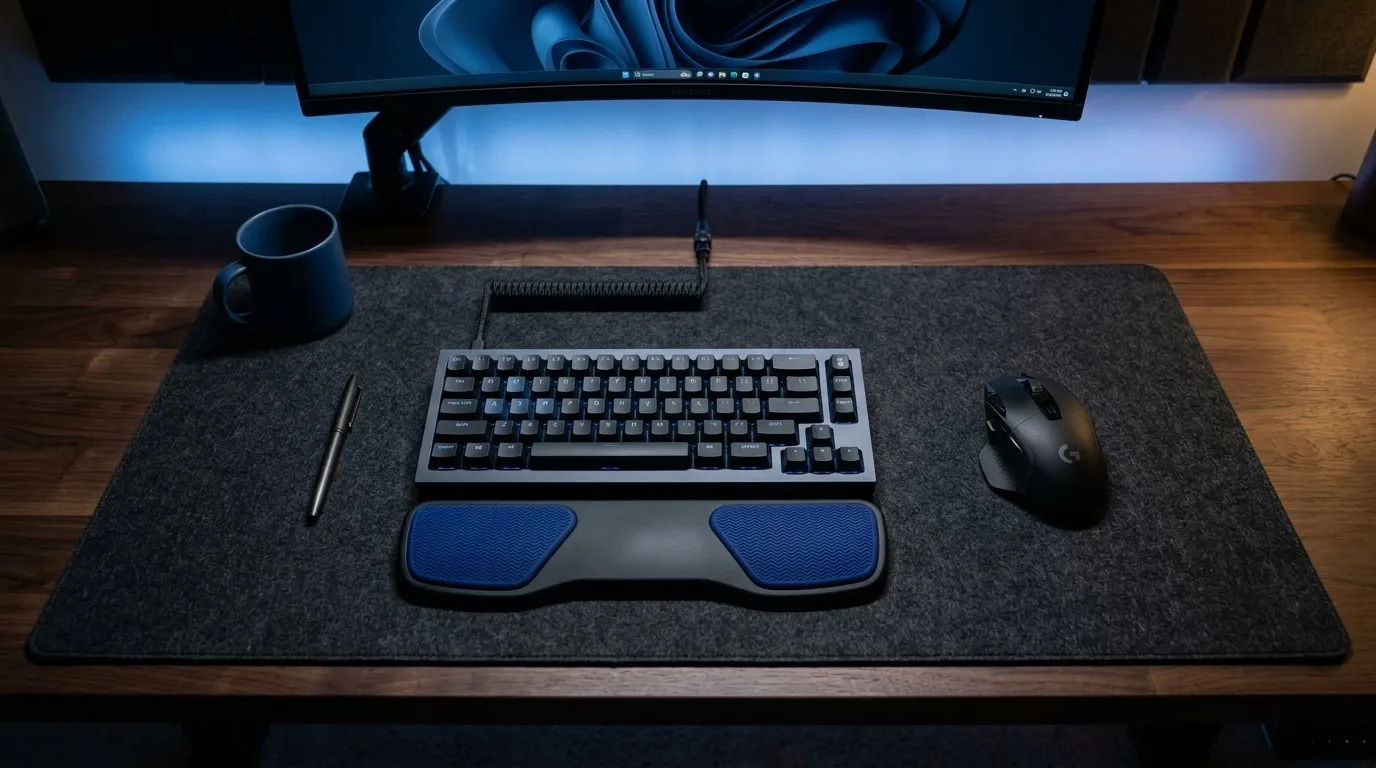
Repetitive strain injuries (RSIs) are the hidden tax of the modern digital lifestyle. If you spend hours editing videos, writing code, or managing digital content, your wrists are actively paying that price. Traditional static foam pads fail because they lock your wrist into a single spot, forcing unnatural lateral bending.
The badseed tech carpio completely redefines this experience. Born from a collaboration between DeltaHub and tech YouTuber Brian Panao (BadSeed Tech), this limited-edition device balances anatomical optimization with a premium, industrial “dark mode” desk aesthetic. It attempts to shield your median nerve from compression while elevating your workspace setup.
In this real-world evaluation, we break down every technical element, surface compatibility metric, and structural advantage to see if the badseed tech carpio deserves a permanent place next to your high-end mouse.
Ergonomic Engineering Behind the BadSeed Tech Carpio
To understand why the badseed tech carpio functions differently than any macro pad or silicone block you’ve used before, you must understand the underlying medical logic. Most conventional wrist rests press directly against the underside of your wrist joint. That specific point is precisely where the carpal tunnel lies, a narrow, delicate pathway composed of bones and ligaments that protects your median nerve and major tendons.
Applying continuous vertical pressure to this soft tissue area during an eight-hour shift cuts off blood circulation and triggers chronic nerve irritation. The functional approach of the Badseed Tech Carpio flips this flawed design entirely.
Rather than supporting the soft wrist joint, it elevates the base of your palm. By placing the primary weight-bearing zones under the hyper-resilient muscle groups of your hand—specifically the thenar eminence (the muscular pad at the base of your thumb) and the hypothenar eminence (the outer edge of your palm) the Badseed Tech Carpio keeps your carpal tunnel completely floating in mid-air. This anatomical posture alignment reduces micro-stress accumulation across your tendons, keeping your hand fully responsive during extended creative sessions.
Unboxing the BadSeed Tech Carpio Limited Edition Variant
When you order the Badseed Tech Carpio package, you aren’t just receiving a basic cardboard box with a piece of plastic inside. True to Brian Panao’s meticulous reputation for premium unboxing presentation, the packaging feels premium and intentional.
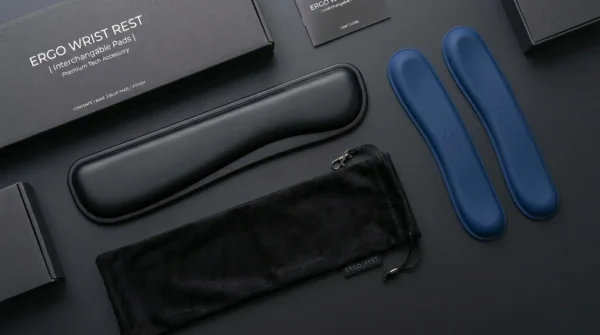
Inside the Retail Box
- One complete DeltaHub Carpio 2.0 chassis in matte black with pre-installed standard black ergonomic pads.
- One exclusive set of replaceable badseed tech carpio signature blue silicone pads.
- A protective microfiber carrying pouch designed for digital nomads.
- Detailed visual alignment instructions to ensure correct palm placement.
The foundation of the device consists of a lightweight, structural-grade ABS copolymer base plate. This material ensures that even under heavy, downward pressure from your hand, the device retains absolute rigidity without cracking.
The standout highlight of this specific creator model is the color coordination. The iconic “BadSeed Tech Blue” silicone inserts feature a soft-touch matte finish that coordinates perfectly with minimalist dark setups, custom mechanical keyboards, and stealth-themed workspaces.
Physical Dimensions and Sizing Metrics of the BadSeed Tech Carpio
Choosing the incorrect physical profile for your badseed tech carpio will completely ruin your ergonomic experience. If the chassis is too large, your hand will slip out of alignment; if it is too small, the hard ABS plastic frame will dig into your skin. DeltaHub manufactures this specialized badseed tech carpio accessory in two distinct sizes to match varying palm structures.
To choose your correct size, place your hand flat on a table and measure the exact width of your palm from the base of your index finger to the base of your pinky finger using a ruler.
| Physical Measurement Metric | Small Profile Variant | Large Profile Variant |
| Chassis Width x Length | 8.4 cm x 3.6 cm (3.3″ x 1.4″) | 9.6 cm x 4.0 cm (3.8″ x 1.6″) |
| Total Physical Weight | ~17 grams | ~22 grams |
| Palm Width Compatibility | Hands smaller than 8.5 cm across | Hands larger than 8.5 cm across |
| Ergonomic Elevation Height | 1.5 cm (0.59 inches) | 1.7 cm (0.67 inches) |
If your palm width sits exactly on the 8.5 cm border line, we highly recommend selecting the Small size profile. A more compact badseed tech carpio allows for tighter, more agile tracking adjustments near your mouse sensor, whereas an oversized frame can occasionally clip the edge of your keyboard housing during fast horizontal movements.
Desktop Surface Tracking Performance of the BadSeed Tech Carpio
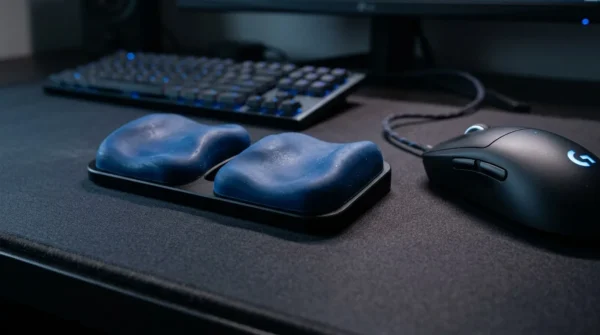
The defining mechanical innovation of the badseed tech carpio is its ability to glide freely across your desk space alongside your pointing device. This active tracking locomotion is achieved via premium, low-friction PTFE (Polytetrafluoroethylene) Teflon gliders mounted directly to the underbelly of the ABS base plate. These are the same high-grade chemical compounds utilized by aerospace engineers and top-tier gaming mouse brands to guarantee fluid movement.
However, real-world gliding performance depends heavily on your choice of desk surface. Let’s analyze how the badseed tech carpio behaves on different popular desk mat materials:
Neoprene and Cordura Fabric Pads
This is the optimal environment for the badseed tech carpio. The dense weave of synthetic fiber structures allows the PTFE gliders to move with virtually zero initial static friction. When executing macro tracking sweeps across your ultra-wide monitor, the wrist support glides perfectly in sync with your mouse, eliminating the need to constantly pick up and re-position your hand.
Premium Wool Felt Mats
If your workspace is optimized for the clean visual look of a minimalist felt pad, the badseed tech carpio performs surprisingly well. Because the edges of the PTFE skates feature precisely round-molded bevels, they pass over raw wool fibers without catching or snagging. You will experience a soft, quiet glide that feels exceptionally smooth during daily editing workflows.
Hardwood and Hard Plastic Desks
Using the badseed tech carpio directly on uncarpeted wood veneer or hard composite plastic can lead to inconsistent friction feedback. If a single speck of hard dust gets trapped beneath the PTFE feet, it can cause an unpleasant scratching sound and slowly scratch your desktop finish over time. If you operate on a bare wood setup, ensure your tracking surface is wiped clean daily.
Genuine and Vegan Leather Mats
Caution advised. Leather surfaces possess an inherent natural tackiness that increases static friction. When using the badseed tech carpio on premium leather, you may notice a slight “stick-slip” effect when attempting small, granular mouse corrections. If your career requires micro-precision tasks, such as detailed vector illustration or vector pen tracing, you will want to opt for a fast cloth or hybrid pad instead.
Model Comparison: BadSeed Tech Carpio vs. Standard 2.0 vs. Gaming G2.0
With multiple variations of the DeltaHub product catalog circulating across digital storefronts, it can be difficult to determine exactly where the badseed tech carpio configuration sits within the broader ecosystem. This structural comparison highlights the differences in feature sets, build components, and target use cases:
The Standard DeltaHub Carpio 2.0
The base model is designed strictly for clean, corporate productivity setups. It features monochromatic silicone pads (available in basic black, white, and gray tonal profiles) and matches well with basic office hardware. Mechanically, it functions identically to the creator version, but it lacks the visual pop and collectible appeal found in the custom collaborative packaging.
The Creator BadSeed Tech Carpio Special Edition
This specific badseed tech carpio edition bridges the gap between raw functional health and high-end aesthetic customization. By including both the baseline workplace pads and the highly contrasting BadSeed Tech custom blue elements, it offers dual setup adaptability. It caters directly to mechanical keyboard enthusiasts and content creators who view their desktop workstation as an extension of their personal brand identity.
The Carpio G2.0 Gaming Model
The G2.0 variant introduces a fundamental design shift tailored for competitive, high-velocity mouse tracking. Unlike the strapless profile of the badseed tech carpio, the G2.0 includes an adjustable, breathable elastic mesh strap coupled with a magnetic locking buckle that wraps securely around your palm. This mechanism ensures that if you lift your mouse completely off your pad during intense gaming maneuvers, the ergonomic frame remains attached to your hand.
Navigating the 2-Week Adjustment Curve of the BadSeed Tech Carpio
Do not expect immediate comfort, the absolute second you place your hand onto the badseed tech carpio frame. In fact, for the first few days, you might find the experience slightly jarring. This initial discomfort is completely normal and represents a critical adjustment phase that trips up most novice users.
For years, your hand muscles have been conditioned to collapse flat against your desktop surface. When you introduce the elevated geometry of the badseed tech carpio, it instantly forces your hand into an unfamiliar, active ergonomic posture.
| Phase | Duration | Muscle Experience & Adaptation |
| Phase I | Days 1–3 | Mild muscle awareness in the palm; natural reconditioning phase. |
| Phase II | Days 4–7 | Fluid gliding habits form; horizontal wrist stretching drops significantly. |
| Phase III | Days 8–14 | Muscle memory locks in completely; traditional flat posture feels unnatural. |
The intrinsic tiny muscles inside your thenar and hypothenar eminences are being called upon to support structural weight they aren’t used to handling. To move past this adjustment phase successfully without straining your hand, use the device in intervals of two hours per day for the first week, gradually ramping up to full-time usage. Once your hand builds the muscle memory to relax into the contoured silicone cups, the motion of gliding across your workspace will feel like second nature.
Addressing Long-Term Durability and PTFE Maintenance Concerns
No premium workspace accessory is completely flawless, and a transparent evaluation of the badseed tech carpio requires looking closely at its long-term durability metrics. Over a year of continuous, daily eight-hour use, the device is subjected to significant physical friction and shearing forces.
The Issue of Skate Adhesive Migration
A common point of failure noted by intensive power users involves the adhesive backing used to secure the low-friction PTFE gliders to the bottom of the ABS frame. Over extended periods of friction across warm cloth mats, the factory-applied bonding glue can slowly soften. This can cause one of the Teflon feet to shift micro-millimeters out of its molded recessed slot, leaving behind a sticky residue trail that collects cloth lint.
The Factory Glue Repair Method
If you encounter glue migration on your Badseed Tech Carpio gliders after months of heavy use, do not throw the device away. The fix is remarkably simple. Carefully peel back the sliding PTFE foot using a flat razor blade. Clean away the degraded factory adhesive residue using a cotton swab dipped in 99% Isopropyl Alcohol.
Apply a microscopic drop of high-strength Cyanoacrylate (standard super glue) or a fresh sliver of 3M heavy-duty double-sided tape to the center of the recessed channel. Firmly press the Teflon glider back into place for 60 seconds to lock in its smooth, flat alignment.
Maintaining the Silicone Pads
The custom blue silicone pads on your badseed tech carpio are natural collectors of skin oils, dead cells, and desktop dust particles. If left uncleaned, the vibrant blue matte finish will begin to take on a glossy, darkened patina. To maintain its look, pop the removable silicone pads out of their plastic alignment pins once every month and wash them under warm water with a single drop of mild dish soap. Allow them to air dry completely before snapping them back into place.
Summary of the BadSeed Tech Carpio Value Proposition
Retailing at a premium price point compared to generic, static foam cushions, the Badseed Tech Carpio represents an intentional investment in long-term musculoskeletal wellness. It successfully eliminates the primary structural flaw of old-school desk supports by ensuring that protection from strain never comes at the cost of fluid, unrestricted movement.
Core Advantages
- True Ergonomic Pressure Shifting: Safely keeps your delicate carpal tunnel floating to protect your median nerve.
- Flawless Gliding Action: High-grade PTFE skates move smoothly across cloth and felt mats.
- Stunning Design Language: The exclusive BadSeed Tech Blue colorway adds a refined contrast to high-end workstations.
- Replaceable Components: Modular silicone inserts can be detached and cleaned easily to prolong product life.
Notable Disadvantages
- The Learning Curve: Requires an initial 7-to-14-day break-in phase before it feels truly comfortable.
- Surface Restrictions: Does not perform optimally on high-friction genuine or vegan leather mats.
- Adhesive Wear: Factory skate glue may require maintenance after extended periods of intensive daily use.
If you are a casual computer user who only spends an hour or two at a desk every day, a specialized tool like the Badseed Tech Carpio may be more than you need. However, if you are a professional content creator, developer, or digital strategist whose career depends directly on high-speed mouse tracking and pain-free wrist health, this collaboration piece is a true game-changer. It successfully transforms a sterile medical necessity into a beautiful, high-performing asset for your desk setup.
Conclusion
In summary, investing in the badseed tech carpio is less about buying a static accessory and more about changing your operational mechanics. By keeping your wrist fully dynamic and isolating high-pressure friction away from critical nerve clusters, it mitigates long-term career fatigue.
While the learning curve requires discipline, the physical payoff becomes highly apparent within two weeks. For those matching it with high-end dark desk setups, the custom styling makes it a brilliant visual and physical upgrade.
Frequently Asked Questions (FAQs)
What makes the badseed tech carpio different from the standard version?
The core difference lies in the exclusive customization profile. The badseed tech carpio includes limited creator-edition custom blue silicone pad inserts that match dark desktop aesthetics, along with special collectible creator packaging.
Can I use the Badseed Tech Carpio for competitive FPS gaming?
Yes, but the strapless design requires an adjustment period. For high-speed or aggressive vertical lifting, you might prefer the dedicated Carpio G2.0 model, which includes a secure magnetic sport strap.
How do I accurately measure my hand size for the Badseed Tech Carpio?
Place your palm flat on a flat surface and measure its absolute horizontal width from the index knuckle to the pinky knuckle. If your reading is under 8.5 cm, select the Small variant.
Why does my palm feel sore after using the badseed tech carpio for an hour?
Your hand muscles are adapting to an active ergonomic posture alignment. This micro-fatigue is part of the standard 14-day reconditioning wall and will pass as muscle memory stabilizes.
Will the badseed tech carpio scratch my raw wood desk surface?
If the desk surface accumulates coarse dust or abrasive debris particles, they can become trapped beneath the PTFE feet. We strongly advise using a soft fabric or felt desk mat.
How often should I clean the blue silicone pads on my Badseed Tech Carpio?
Washing them once a month is optimal to clear away sweat oils and dead skin buildup. Use lukewarm water with a drop of simple dish soap to maintain the bright matte finish.
Are the lower PTFE skates on the badseed tech carpio replaceable?
Yes, you can swap them out or reapply adhesive if they shift over time. DeltaHub sells official replacement skates, or you can use standard aftermarket mouse glide sheets, cut out manually.
Does the Badseed Tech Carpio work well for left-handed mouse users?
The device features an asymmetrical, side-specific engineering design optimized for right-handed mouse orientations. Left-handed digital specialists must purchase the specific left-side configuration option from the drop-down menu.
Can I use the Badseed Tech Carpio comfortably with a vertical ergonomic mouse?
It is not recommended because vertical mice already pivot your palm angle sideways into a handshake position. The contoured shape of this pad is designed for standard horizontal input surfaces.
Is the badseed tech carpio completely TSA-friendly for travel?
Absolutely, the structural assembly is built purely from ABS composite polymer, silicone, and PTFE gliders. It fits cleanly into its micro-fiber travel pouch for safe commuter storage inside tech bags.